Module: L3-M01 · Duration: ~120 min (estimate, including the independent exercise) · Previous: L2-M08-L04 (Level 2 capstone) · Next: L02
1. Introduction
The word "agent" gets stuck on many things: a chatbot that can call a function, a chain of three model calls in a fixed order, an assistant that decides for itself which file to open and which command to run. These three need three different test plans. This lesson tells them apart with a sourced definition: Anthropic's "Building effective agents" article splits systems into workflows (models and tools orchestrated through predefined code paths) and agents (the model directs its own process and tool use) [R1]. Level 2 grades the output; Level 3 also grades what the agent does, and the end-state oracle (§5.3) is a code grader (L2-M01-L03) that looks at the state of the environment. The lesson also opens the lab for the whole module: a small simulated agent with tools that run in a sandbox.
This lesson opens learning outcome 1 of Level 3: draw the architecture of an agent and identify the risk at each step. The product: a workflow-or-agent label with reasons for each system, and a tool layer that has been tried with bad calls. Every "model" in the lab is a simulated policy; there are no real model calls.
2. Learning objectives
- Tell a workflow from an agent using the definition in [R1] and apply it to a system's description. Practice: §8.2 part B, §8.3 (line 7), §9 (TODO 1 and 3).
- Identify the four parts of an agent (model, tools, loop, environment) in the lab. Read: §8.2 part C.
- Check a tool call in the right order: name, JSON, schema, and only then the tool body. Practice: §8.3 (lines 1 to 6), §9 (TODO 2).
- State the lab's sandbox rules and run the tests that prove them. Practice: §8.4.
- State what the workflow/agent label does not tell you. Read: §6.1; practice: §8.3 (line 7).
- Compare a "direct" run with a "react" run on the same simulated task. Practice: §8.3 (lines 8 and 9).
3. Prerequisites and tools
- L2-M08-L04, L1-M05-L03 to L05 (tool definitions, parameter validation, a chat agent with fake tools), L1-M04-L04 (prompt injection), L1-M07 (pytest). The lab code is
code-labs/l3-m01; it needs onlypytest. - Separating the senses. Agent has the same meaning as in L1-M05-L05; this lesson only makes the definition tighter. A tool is an application function the model can ask to have called; in the lab every tool is simulated and runs in a sandbox. Oracle is still the "mechanism that decides pass or fail" of L1-M01-L01; an "end-state oracle" looks at the final state of the environment, which differs from the "oracle context" of L2-M06-L04. The plan in L03 is the agent's plan, which differs from the "comparison plan" of L2-M07. The environment is where tools take effect: in the lab it is a temporary sandbox directory.
- The earlier policy still stands: offline, fake tools or a sandbox, and real-world effects need a person to approve. Lints and validators only flag; the loop guard and the limits lint (L02) block the run (fail closed); a person decides the thresholds.
4. Concept explanation
4.1 Workflow and agent
[R1] defines a workflow as a system in which models and tools are orchestrated through predefined code paths, and an agent as a system in which the model directs its own process and tool use. It calls both together "agentic systems". It lists five workflow patterns: prompt chaining, routing, parallelization, orchestrator-workers and evaluator-optimizer [R1]. In routing, the model only classifies the input and then hands off to a predefined branch; the path is still defined by code.
[R1] advises looking for the simplest solution and increasing complexity only when needed, says agents often trade latency and cost for better task results, and says that for agents "extensive testing in sandboxed environments" together with suitable guardrails is necessary because of the higher cost and because errors can compound [R1]. A note at the top says that most of the tooling it describes has changed since 12/2024; this lesson uses only the conceptual part.
4.2 The four parts of an agent
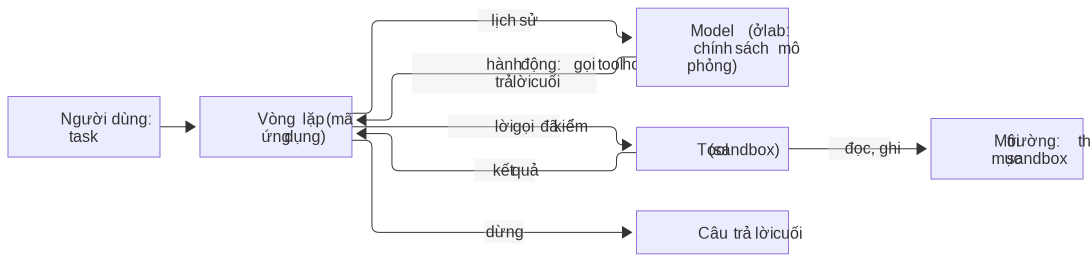
According to [R1], an agent is typically just a model using tools based on environment feedback in a loop, and at each step it needs "ground truth" from the environment (tool results, code execution results) to assess progress. The Claude tool use documentation says the same thing at the code level: the model runs nothing itself; it emits a structured request, the application's code performs the operation and returns the result into the conversation [R2]. That gives four parts:
- Model: decides the next step (which tool to call with which parameters, or give the final answer).
- Tools: the operations the application allows (computation, lookup, writing notes).
- Environment: the state that tools change and report back on.
- Loop: the code that repeats "ask the model, run the tool, feed the result back" until it stops.
The consequence for QA: the loop and tool execution live in your code, so ordinary tests can check them; in the lab only the model's decision part is non-deterministic (in a real system, tools that touch the network or outside data are too).
4.3 Why autonomy is a risk
The OWASP project on LLM application risks calls Excessive Agency the vulnerability that allows a damaging action to happen when the LLM's output is unexpected, ambiguous or manipulated, whatever the cause; the page names three common root causes: excessive functionality, excessive permissions and excessive autonomy [R3]. The mitigations include reducing the number of tools and their permissions, and requiring a person to approve high-impact actions [R3]. With an agent, an injected instruction (L1-M04-L04) can become a real tool call, so the risk map (L05) starts from the list of tools and permissions.
5. Technical deep dive
5.1 The lab's tool layer: the order of checks
lab/tools.py defines four simulated tools: calc (arithmetic), lookup (a lookup in the class's fake knowledge table), notes_add and notes_read (write and read a notebook). call_tool(sandbox, name, json_arguments) checks in a fixed order: (1) the name must match a registered tool exactly, with no trimming of whitespace and no case folding ("calc " and "Calc" are both UNKNOWN_TOOL); (2) the arguments must be exactly one strict JSON object: broken JSON, NaN, Infinity, duplicate keys and values that are not an object are all rejected (BAD_JSON, BAD_ARGUMENTS); (3) exactly the required keys with exactly the right types (true is not a string); (4) a transient error is injected first (TRANSIENT); (5) the tool body. In a real API, tool arguments are a JSON object [R2]; the lab accepts them as text so that it can also try broken JSON. The result always has the form {ok, content, error, cost} and every call is recorded in sandbox.effects.
5.2 Sandbox rules
calc does not use eval: it parses the syntax and accepts only numbers, + - * /, the minus sign and powers with an integer exponent whose absolute value is at most 8, at most 60 characters long, with every number, even one written out in full, at most 30 digits; a non-integer result is rounded to 4 decimal places. Full-width digits (such as "12") and invisible characters are rejected rather than normalized. lookup only reads a fake table; the key is NFC-normalized, lowercased, with invisible characters removed. notes_add writes only ten.txt in the sandbox's notes directory, with a name matching [a-z0-9_]{1,32} that is not a Windows device name such as con (the lab has not been tried on Windows), content of at most 200 characters, and at most 5 notebooks. No tool runs a shell, opens the network or reads outside the sandbox; a static test scans lab/*.py for process modules, network modules and calls to eval, exec and open (only a proxy, §6.2).
5.3 Simulated policies and tasks
lab/policies.py has three policies (direct, plan_execute, react; studied closely in L03) and lab/tasks.py has nine fake tasks for HocVui Assistant (a fictional product, a study assistant for primary school pupils). A policy is a deterministic function from history to action, written by the lab author together with the task, and it "understands" a task through the list of intents in the data. Tasks are graded by an end-state oracle: the final answer must equal the expected string and the sandbox directory must hold exactly the expected notebooks, with no extra notebook. It does not look at the agent's path.
5.4 The workflow-or-agent classifier
lab/classify.py takes a self-declared spec with six fields: whether it uses an LLM, who decides the next step (code or model), whether the model only picks a predefined branch, who picks the tool, what kind of loop it runs, and whether results are fed back to the model. The rules, first match wins: no LLM gives not_llm_system; code deciding the next step gives single_call (no tools, no loop) or workflow (even when code controls the loop, or the model only picks a branch); the model deciding the next step and picking the tool and looping until a code condition or a model signal and receiving feedback gives agent; anything else is unclear, and a person decides. The twelve fictional systems in data/systems.json give 1 single_call, 5 workflow, 3 agent, 1 not_llm_system and 2 unclear, on purpose: planner-and-workers (the model splits the work at run time, but [R1] files orchestrator-workers among the workflows) and a one-round tool chat (no real loop).
6. The QA perspective
6.1 A label says nothing about quality
- The spec is self-declared; the classifier cannot read a real system. A product that calls itself an "AI Agent" but runs three model calls in a fixed order (system
s08) gets the labelworkflow. - A label is not a risk level: a workflow with a write tool can be more dangerous than a read-only agent; risk comes from tools and permissions (L05).
- "Has tools" does not mean agent (system
s02has a tool but is a workflow), and a workflow is not automatically better: [R1] only advises choosing the simplest solution that is enough.
6.2 Checking at the tool layer
The errors worth trying first: a tool name that is one character off, JSON with a missing closing bracket, a duplicate key, NaN, the right keys with the wrong type, a notebook name containing ../, exceeding the notebook count, text that cannot be encoded as UTF-8. The tests assert both the error code and that no file is created outside the sandbox when the name is bad.
What these checks do not say: calc is safe only within the syntax it allows, and nothing follows about any real tool; a static test does not see a dynamic import built from a string; a simulated sandbox does not replace an operating system sandbox; effects is an in-memory log, not audit evidence.
7. Real-world scenarios
Scenario 1 (fictional): "A language assistant that calls itself an agent". A team sells an "AI Agent" feature for English classes. QA fills in the spec: the three model calls always run in the order translate, correct errors, summarize, so the label is workflow; each fixed step has its own test, and there is no need to test "choosing a tool". The product owner signs the label note.
Scenario 2 (fictional): "A notebook that takes file names from the model". HocVui Assistant saves notes under a name chosen by the model. A tester sends the name ../../hoso. The tool layer returns BAD_NAME and the temporary directory stays empty. If the name were joined straight into a path, an injected instruction could write outside the intended directory, exactly the excessive-permissions form of [R3].
8. Hands-on tutorial
8.1 Setup
cd academy-content/code-labs/l3-m01
python3 -m venv .venv && source .venv/bin/activate     # Windows: .venv\Scripts\activate
python -m pip install -r requirements.txt
python -m pytest            # 79 passed
8.2 Run the demo
python -m lab.demo l01
Output (copied from a real run on Python 3.14.6 and 3.12.14, 2026-11-04; the two versions gave identical output). Every tool, task and policy is simulated:
A. tool calls (SIMULATED tools, sandboxed)
   'calc' {"expression": "12*7+5"} -> ok=True error=None content='89'
   'calc' {"expression": "__import__('os')"} -> ok=False error=BAD_EXPRESSION content='not a plain arithmetic expression'
   'calc ' {"expression": "1"} -> ok=False error=UNKNOWN_TOOL content='unknown tool'
   'calc' {"expression": "1" -> ok=False error=BAD_JSON content='arguments are not one strict JSON value'
   'lookup' {"key": "hình vuông"} -> ok=False error=NOT_FOUND content='did you mean: diện tích hình vuông'
   'notes_add' {"name": "../x", "text": "a"} -> ok=False error=BAD_NAME content='name must match [a-z0-9_]{1,32}'
   'notes_add' {"name": "chu_vi", "text": "Chu vi = 44"} -> ok=True error=None content='saved'
B. workflow or agent? (rule applied to the 12 fictional specs)
   s01 single_call
   s02 workflow
   s03 workflow
   s04 workflow
   s05 agent
   s06 not_llm_system
   s07 agent
   s08 workflow
   s09 unclear
   s10 unclear
   s11 workflow
   s12 agent
C. the three simulated patterns on t03 (13 x 9 with the class formula)
   direct: stop=final steps=1 model_calls=1 tool_calls=0 cost=2 success=False
   plan_execute: stop=final steps=4 model_calls=4 tool_calls=2 cost=10 success=True
   react: stop=final steps=3 model_calls=3 tool_calls=2 cost=8 success=True
Reading the output: part A is seven tool calls (name, raw arguments, result). Part B is the label of the twelve fictional systems. Part C runs the three policies on task t03 (the area of 13 x 9, which needs looking up the formula and then computing); cost is in fake cost units (cu): a model call costs 2 cu, a tool call 1 or 2 cu. direct is wrong because this policy only "computes in its head" correctly when the result is below 100 (117 is not): a design choice of the simulation, not a property of a real model.
8.3 Try it yourself
Save it as try_l01.py in the lab's root directory (next to lab/, not inside lab/), run python try_l01.py, then delete the file:
import json
import tempfile

from lab import planning as PL, tasks as T
from lab.classify import classify
from lab.tools import Sandbox, call_tool

with tempfile.TemporaryDirectory() as root:
    sb = Sandbox(root)
    for expr in ["2+3*4", "2**9", "abs(-3)", "10/(5-5)", "1.5*4"]:
        r = call_tool(sb, "calc", json.dumps({"expression": expr}))
        print(expr, "->", r["error"] or r["content"])
    print(call_tool(sb, "Calc", '{"expression": "1"}')["error"], call_tool(sb, "calc", '{"expression": 1}')["error"])

spec = {"uses_llm": True, "next_step_chosen_by": "model", "branch_by_model": False, "tools_chosen_by": "model",
        "repeats": "until_code_condition", "feedback_to_model": True}
print(classify(spec)["label"], classify({**spec, "feedback_to_model": False})["label"], classify({**spec, "repeats": "no"})["label"])
t = next(x for x in T.load_tasks() if x["id"] == "t09")
for pattern in ("direct", "react"):
    r = PL.run_task(t, pattern)
    print(pattern, r["stop_reason"], r["steps"], r["success"])
Output (Python 3.14.6 and 3.12.14 identical):
2+3*4 -> 14
2**9 -> BAD_EXPRESSION
abs(-3) -> BAD_EXPRESSION
10/(5-5) -> DIV_ZERO
1.5*4 -> 6
UNKNOWN_TOOL BAD_ARGUMENTS
agent unclear unclear
direct final 1 False
react final 2 True
Reading it: lines 1 to 5 are the five expressions; 2**9 is rejected because the exponent exceeds 8, abs(...) because it is a function call. Line 6: the name Calc is rejected (UNKNOWN_TOOL), and expression as a number instead of a string is rejected (BAD_ARGUMENTS). Line 7: one spec gives agent, then unclear when feedback is dropped, then unclear when there is no loop. Lines 8 and 9: on t09 (compute (48+52)*37), direct answers at once and is wrong, react takes two steps and is right.
8.4 Run the lesson's tests
python -m pytest tests/test_l01_tools.py tests/test_l01_classify.py -v
Result: 20 passed (13 tests of the tool layer, 7 of the classifier and tasks). Read test_notes_names_cannot_escape_the_sandbox, test_unknown_tool_names_must_match_exactly and test_no_real_execution_primitives_in_the_lab_source. The tests run on in-memory values and files in a temporary directory; no test calls the network.
8.5 Troubleshooting
| Symptom | Cause | Fix |
|---|---|---|
calc returns BAD_EXPRESSION for an expression you think is valid |
It has a function, a variable name, an exponent above 8, a full-width digit or an invisible character | Use only numbers and + - * / ** |
classify returns invalid_spec |
A missing field, an unknown field, or 1 instead of True |
Use exactly the six fields of FIELDS |
9. Independent exercise
Problem: Label six fictional systems, guess which tool calls the sandbox does not accept, and fix one system's spec.
Requirements: complete exercises/test_l01_agent.py:
- TODO 1:
LABELS: the label of each system inexercises/ex_systems.json, decided from the description first, then checked against the spec. - TODO 2:
REFUSED: the set of indexes (from 0) of the calls inexercises/ex_calls.jsonfor which the sandbox returnsok=Falsefor any reason. Reason through each call; do not just run them all. - TODO 3:
X7: fix the draftX7_DRAFT(six fields, with one error) for the "shopping assistant" described in the file, so thatlab.classifylabels itagentand the spec matches the description.
Test data: exercises/ex_systems.json (six fictional systems), exercises/ex_calls.json (eight tool calls, with arguments as JSON text).
Deliverable: the three variables above, in the file exercises/test_l01_agent.py itself.
Acceptance criteria: python -m pytest exercises/test_l01_agent.py passes (3 tests), recomputed with lab.classify and lab.tools. The tests do not check your reason for choosing a label, and do not check that the label is right for a real system (the systems are fictional).
Hints: TODO 1: for each description, go through the six fields of §5.4 in order before looking at the spec. TODO 2: go through the order of checks in §5.1; a call can pass every check and still fail in the tool body. TODO 3: compare each field of the draft with the description.
10. Knowledge check
0/18 done · Results are kept in this browser only.
P02 · True or false
P04 · Select all that apply
P05 · Put in order
P06 · Match
P07 · Spot the bug
A colleague wrote the function below to choose a notebook path in the sandbox. The function has one bug that lets a notebook name escape from the notes directory. Find it.
from pathlib import Path

def note_path(notes_dir, name):
    path = Path(notes_dir) / f"{name}.txt"
    if str(path).startswith(str(notes_dir)):
        return path
return NoneP08 · Short answer
Two fictional systems. X "Homework reminder": three model calls in a fixed order, code chooses every tool, and notes_add writes a notebook and needs no human approval. Y "Word lookup": the model decides the next step and chooses the tool, loops until the model says it is done, receives the tool results, and has only read tools. What label does classify give each system, and is the label enough to decide which system needs closer tool checking?
P09 · Essay
Write 5-8 sentences answering the following proposal (fictional, simulated): "Give the HocVui assistant a run_shell tool that runs any command so the agent is more autonomous, because that is what makes it an agent." State how the three root causes of excessive agency per [R3] relate, what you check at the tool layer before allowing it, and what the lab's checks do not guarantee.
P11 · Recall
Lesson: L2-M01-L03P12 · Recall
Lesson: L1-M04-L04P13 · Multiple choice
P14 · Select all that apply
P15 · True or false
P16 · Fill in the blank
P17 · Match
P18 · Multiple choice
11. Summary
- Concepts: workflow and agent [R1]; the four parts of an agent; end-state oracle; excessive agency [R3].
- Skills: classifying a description with six fields; checking a tool in the order name, JSON, schema, body.
- Traps: treating a label as a risk level; treating "has tools" as agent; trusting a self-declared spec; treating a simulated sandbox like a real one.
- You can now: take an "agent" description and ask: who decides the next step, who picks the tool, is there a loop and feedback, which tool has write permission.
12. References
| ID | Title | Publisher | URL | Accessed | Relevance |
|---|---|---|---|---|---|
| R1 | Building effective agents | Anthropic | https://www.anthropic.com/engineering/building-effective-agents (redirects to /research/building-effective-agents) | 2026-11-04 | Read the page text (fetched directly, read the passages on definitions, workflow patterns, the loop, stop conditions, sandboxes), checked against the fetch tool's automatic summary; the two appendices were not read in full. A note at the top says the tooling has changed since 12/2024 |
| R2 | How tool use works (Claude Platform Docs) | Anthropic | https://platform.claude.com/docs/en/agents-and-tools/tool-use/how-tool-use-works | 2026-11-04 | Read the page text (the passages on the tool use contract and the agentic loop); the server tools section was not read |
| R3 | LLM06:2025 Excessive Agency (OWASP Gen AI Security Project) | OWASP | https://genai.owasp.org/llmrisk/llm062025-excessive-agency/ | 2026-11-04 | Read the page text (definition, three root causes, mitigations); the attack scenarios were not read |
Key terms (English ↔ Vietnamese)
| English | Tiếng Việt |
|---|---|
| Agent | Hệ thống trong đó model tự điều khiển quy trình và việc dùng tool [R1] |
| Workflow | Hệ thống điều phối model và tool bằng đường mã định sẵn [R1] |
| Simulated policy | Chính sách mô phỏng: hàm tất định thay cho model, do tác giả lab viết |
| Sandbox | Vùng cách ly cho tool: ở lab là một thư mục tạm cùng quy tắc tên và giới hạn |
| End-state oracle | Cơ chế chấm pass/fail dựa trên trạng thái cuối của môi trường và câu trả lời cuối |
| Excessive agency | Quyền tự quyết thừa của agent: chức năng, quyền hoặc tự chủ vượt mức cần thiết [R3] |