Module: L1-M01 · Duration: ~120 min (estimate, including the independent exercise; L01 also includes first-time setup) · Previous: L01 · Next: L03 - Sampling, temperature and non-determinism
1. Introduction
An LLM does not read "letters" or "words". It reads tokens. API costs (the API is the gateway through which a program calls the services of a model provider) are charged per token, the length limit of a request is measured in tokens, and when a conversation gets too long, the part that is cut off is also measured in tokens.
Many hard-to-find defects of LLM features come from here:
- The chatbot "forgets" its instructions after a few dozen chat turns.
- Answers are cut off midway.
- The API bill is unusually high for Vietnamese-speaking users.
This lesson helps you design tests for those risks.
2. Learning objectives
- Explain what a token is and why the number of tokens is not the number of words or characters.
- Identify the parts of a request that count towards the context window.
- Compute a context budget (a token budget) that includes the output reserved in advance.
- Design test cases for the behaviour that cuts back conversation history (history trimming).
- Verify with pytest that history is trimmed oldest first, and explain why the design of the function guarantees that the system prompt is never cut.
3. Prerequisites and tools
- You have completed L01 and set up the lab environment.
- You know boundary value analysis from traditional testing.
4. Concepts
4.1 Token
According to Anthropic's glossary, a token is the smallest unit a model processes. A token can correspond to a word, part of a word (a subword), a character, or even a byte [R1]. Before the model processes text, a tokenizer turns the text into a sequence of tokens.
Analogy: picture an old-fashioned printing press. The printer has ready-made type for common letter combinations such as "ing" or "the", but rare words have to be set character by character. Common words take little type; rare words take a lot.
Everyday example. Sending goods with a delivery service: the fee is per box, not per item. Common items fit snugly in one box; odd-shaped items must be split into several small boxes. Every courier has its own set of box sizes, so the same shipment can become a different number of boxes. A token is a "box"; a tokenizer is "one courier's set of boxes".
Worked example. Count the tokens of the system prompt from the demo in section 8 with the toy tokenizer (run in the lab folder with the venv active):
python -c "from lab.tokenizer import tokenize; t = tokenize('you are a test assistant'); print(len(t), t)"
20 ['<0x79>', '<0x6F>', '<0x75>', ' ', 'a', '<0x72>', '<0x65>', ' ', 'a', ' ', 'test', ' ', 'a', 's', 's', 'is', '<0x74>', 'a', '<0x6E>', '<0x74>']
The sentence "you are a test assistant" has 24 characters and 5 words, yet costs 20 tokens, because "you", "are" and "assistant" are not in the toy vocabulary and get split into small pieces or bytes. Three different numbers (characters, words, tokens) are why you must never guess tokens from a word count. Output run on 2026-11-06 on Python 3.14.6 and 3.12.3, Linux, identical on both versions; the same holds for every other output in this lesson.
What matters for testers:
- Each model can use a different tokenizer. Anthropic notes that the number of characters per token depends on the model and the language. Specifically, Claude models from 4.7 onwards use a new tokenizer that produces about 30% more tokens for the same text than earlier models. On those earlier models, one token corresponds to about 3.5 English characters [R1].
- Conclusion: do not estimate tokens with a home-made formula and treat it as fact. For an exact number, use the provider's token counting feature with exactly the model you use [R1].
4.2 Context window
Anthropic's glossary describes the context window as the amount of text a model can "look back" on and refer to when generating new text. It is like "working memory", as opposed to the body of training data [R1].
The context-window documentation is more precise: everything in the request counts towards the context window.
That list includes the system prompt, every message in messages (including tool results, images and documents),
the tool definitions, and also the output the model generates in that turn [R2].
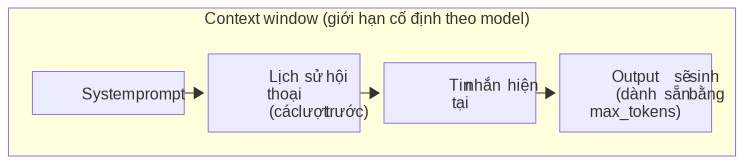
Common misconception: "A large context window means you can just put everything in." Anthropic's documentation warns that as the number of tokens grows, accuracy and recall can decrease. This phenomenon is called context rot [R2]. Longer is not automatically better, and that too is a risk to test.
Everyday example. The whiteboard in a classroom has a fixed size. To write a new lesson the
teacher has to rub out some of the old one, and must leave a corner free for a student to write the
answer. The fuller the board, the easier it is for students to miss an important line. The context
window is that board; the corner kept free is max_tokens.
4.3 When the context window is exceeded
The exact behaviour depends on the provider and the model version. This is why a tester must read the official documentation instead of guessing. For example, with the Claude API according to the documentation of 2026-10-31 [R2]:
- If the input alone already exceeds the context window, the API returns error 400
invalid_request_error("prompt is too long"). - With Claude 4.5 models and later, if the input plus
max_tokensexceeds the context window, the request is still accepted. When output generation hits the limit, the model stops withstop_reason: "model_context_window_exceeded".
Chat applications often trim old history themselves to keep the request within the limit. Anthropic's documentation mentions that chat interfaces can manage context on a "first in, first out" basis [R2]. Trimming the wrong way is an important source of bugs.
Good vs bad: a test case for the context-window limit. Two ways of writing it for the same risk (kept in English because the dev team reads these test cases):
Weak: Paste a very long text and check that the app does not crash.

Good: Window 8,192 tokens, system prompt 1,200, max_tokens 800 (all measured with the provider's
      token counter for model X). (a) History + message = 6,192 tokens: request succeeds.
      (b) 6,193 tokens: app trims the oldest turn or shows "message too long", never HTTP 500.
      (c) In both cases the request log still contains the full system prompt.
The weak one has no numbers, so nobody knows whether the limit was reached. The good one has three checkpoints: exactly at the limit, 1 token over it, and the system prompt still intact. 6,192 is 8,192 − 1,200 − 800.
5. Technical deep dive
5.1 Subwords and byte fallback
The tokenizer in the lab is a toy. It has a small vocabulary of English pieces ("un", "break", "able", "test", "ing"...). At each position it picks the longest piece in the vocabulary (greedy longest-match). A character that is not in the vocabulary is split into its individual UTF-8 bytes. Thanks to this byte-level fallback mechanism (byte fallback), the tokenizer can encode any text, including characters it has never seen [R1].
In UTF-8, each character is encoded with 1 to 4 bytes [R3]. A Vietnamese character with diacritics such as "ể" takes 3 bytes. With the toy tokenizer, because "ể" is not in the vocabulary, it costs 3 tokens. Real tokenizers have far larger vocabularies, so the actual ratio will be different. The only way to know is to measure with the tokenizer of the model you use.
Worked example. The character "ể" encodes to 3 bytes in UTF-8, so the toy tokenizer gives 3 byte tokens:
python -c "from lab.tokenizer import tokenize; print(tokenize('ể'))"
['<0xE1>', '<0xBB>', '<0x83>']
These three are exactly tokens 3, 4 and 5 of "kiểm thử" in the demo in section 8.4.
5.2 Context budget
A request must satisfy:
tokens(system) + tokens(lịch sử) + tokens(tin nhắn hiện tại) + max_output <= context window
(In the formula, "lịch sử" is the history and "tin nhắn hiện tại" is the current message.)
max_output (the max_tokens parameter in many APIs) is the part reserved in advance for the answer. It
counts whether or not the model uses all of it.
Worked example: why the demo prints used=79. Count each part with the toy tokenizer:
python -c "from lab.tokenizer import tokenize as t; print([len(t(x)) for x in ['you are a test assistant', 'the cat sat on the mat', 'is it testable']])"
[20, 11, 6]
| Part | Tokens | Running total |
|---|---|---|
| system "you are a test assistant" | 20 | 20 |
| history: 3 × "the cat sat on the mat" | 3 × 11 = 33 | 53 |
| user "is it testable" | 6 | 59 |
max_output |
20 | 79 |
79 > 70, so it does not fit. Dropping the oldest turn (11 tokens) leaves 68 ≤ 70: it fits, with 2 to
spare. That is exactly the demo line kept 2 turns, dropped 1 oldest.
5.3 History-trimming strategies and their risks
| Strategy | Risk to test |
|---|---|
| Drop the oldest turn first (FIFO) | Losing information the user gave at the start, for example "I am allergic to peanuts" |
| Truncate each long message | Cutting in the middle of a JSON or code block, which makes the remaining content meaningless |
| Summarise the old history | The summary leaves out or distorts details |
| Accidentally cutting the system prompt as well | Losing the safety and formatting instructions. This is a serious defect |
Everyday example. The class group chat has 500 messages, but you only scroll back through the last 50. Last week a classmate wrote "I am allergic to shrimp" in message 12. Today the group orders a seafood hotpot. Nobody did anything wrong by reading 50 messages, but the "keep only new messages" system lost exactly the most important fact. That is the risk of FIFO, and why exercise 9.1 asks you to keep the profile turn.
6. The QA perspective
- What to test: input length at the boundary (just fits, 1 token over); long multi-turn conversations; Vietnamese
text compared with English; error handling when the input is too long; keeping the system prompt after trimming;
output cut off by
max_tokens. - Why: these are the boundary points of the system, where bugs usually cluster, just as in traditional testing.
- What can go wrong: the application crashes on a "prompt too long" error; the bot forgets its instructions; the answer is cut off while the UI still displays it as normal; costs spike.
- Expected behaviour: decided by the product team, and you must ask for it explicitly. For example: "When the history exceeds the limit, drop the oldest turn, never drop the system prompt, and show a notice when content has been dropped."
- How to detect defects: use the provider's token counting to build inputs exactly at the boundary; write
unit tests for the history-trimming function with a fake token-counting function (as in the lab); check
usagein the response (lesson L04). - How to report: record the measured number of tokens (and which tool measured it), the model,
max_tokens, the number of conversation turns, and which content was lost.
7. Real-world scenarios
Scenario 1 - An English tutor (fictional). In the first turn, the learner says "I am at level A2, please explain in Vietnamese". After 40 turns, the bot starts explaining in English with C1 vocabulary. Cause: the application drops the oldest turn, and the level information was in exactly that turn. Test: build a long conversation that goes past the trimming threshold, then check whether the bot still follows the request from the first turn. Suggestion for the dev team: put the learner's profile into the system prompt instead of leaving it in the history.
Scenario 2 - A contract-summarising copilot for businesses (fictional). A user uploads an
80-page contract. The summary leaves out the penalty clause on the last page without saying anything. Test: use a document
with a "marker clause" placed at the beginning, in the middle and at the end, and check that all three appear in the output.
Also check stop_reason to detect output that was cut off.
8. Hands-on tutorial
8.1 Preparation
Reuse the L01 environment (code-labs/l1-m01, with .venv activated). Nothing else needs to be installed.
8.2 Reading the code: the tokenizer
lab/tokenizer.py, the function tokenize:
def tokenize(text):
    """Greedy longest-match: at each position take the longest known piece."""
    tokens, i = [], 0
    text = text.lower()
    while i < len(text):
        for size in range(min(MAX_PIECE, len(text) - i), 0, -1):
            piece = text[i:i + size]
            if piece in VOCAB:
                tokens.append(piece)
                i += size
                break
        else:
            # Unknown character: one token per byte of its UTF-8 encoding.
            tokens.extend(f"<0x{b:02X}>" for b in text[i].encode("utf-8"))
            i += 1
    return tokens
- The loop
for size in range(..., 0, -1)tries the longest piece first. - The
elseblock of theforloop runs only when the loop did not hitbreak, that is, no piece matched. The character is then split into bytes, written in the form<0xE1>.
8.3 Reading the code: budget and trimming
def check_budget(system, history, user, max_output, window, count=lambda t: len(tokenize(t))):
    used = count(system) + sum(count(turn) for turn in history) + count(user) + max_output
    return Budget(used=used, window=window)
The syntax explained:
lambda t: len(tokenize(t))is a function written compactly on one line: it takestand returns the number of tokens int.count=...in the function declaration is a default value: if the caller does not passcount, the function uses this value.sum(count(turn) for turn in history)adds up the tokens of each turn in the history.Budgethas two attributes:fits(True ifused <= window) andremaining(window - used). For example:check_budget(...).fits.
The count parameter lets you swap the token-counting function. In the tests we pass lambda text: 1 (each
message counts as 1 token) to check the logic exactly, independently of the tokenizer. This
is the dependency injection technique. You will reuse it a lot when testing LLM applications.
trim_history drops the oldest turns one by one until the request fits in the window. It never drops
system and user, and it raises ValueError if the request still does not fit even with an empty history.
8.4 Running the demo
python -m lab.tokenizer
Actual output (2026-10-31):
'unbreakable'    11 chars ->  3 tokens  ['un', 'break', 'able']
'testing'         7 chars ->  2 tokens  ['test', 'ing']
'the cat sat'    11 chars ->  5 tokens  ['the', ' ', 'cat', ' ', 'sat']
'kiểm thử'        8 chars -> 12 tokens  ['<0x6B>', 'i', '<0xE1>', '<0xBB>', '<0x83>', '<0x6D>', ' ', '<0x74>', '<0x68>', '<0xE1>', '<0xBB>', '<0xAD>']

Budget(used=79, window=70)
kept 2 turns, dropped 1 oldest
Reading the result:
- The number of tokens is not the number of words: "the cat sat" has 3 words but 5 tokens, because in this tokenizer spaces are also tokens.
- "kiểm thử" has 8 characters but costs 12 tokens in this toy tokenizer. Note: the toy vocabulary also lacks "k", "m", "t", "h", so those letters become byte tokens too, not only the letters with diacritics. This number does not apply to a real model.
- The request uses 79 tokens, exceeding the window of 70. Dropping one old turn (11 tokens) leaves 68, which fits.
8.5 Running the tests
python -m pytest tests/test_tokenizer.py -v
Expected result: 7 tests pass. The trimming test:
def test_trim_drops_oldest_turns_first_and_keeps_system():
    one_token = lambda text: 1
    kept, dropped = trim_history(
        "sys", ["oldest", "middle", "newest"], "user", max_output=5, window=8, count=one_token
    )
    assert dropped == ["oldest", "middle"]
    assert kept == ["newest"]
By hand: system 1 + 3 turns + user 1 + output 5 = 10 > 8. Dropping "oldest" leaves 9 > 8. Dropping "middle" leaves 8 ≤ 8, which fits. Always be able to compute the expected result before you run the test.
8.6 Troubleshooting
| Symptom | Cause | Fix |
|---|---|---|
| Vietnamese characters display wrongly in a Windows terminal | The terminal's code page | Run chcp 65001 or use Windows Terminal |
A test fails after editing VOCAB |
You changed how tokens are split | This is correct behaviour. Update the expected value after recomputing it |
9. Independent exercise
Problem: The product team wants a cost warning for each request.
Requirements:
Copy the starter file exercises/test_l02_cost.py into tests/ and fill in the TODO places.
- Write the function
estimate_cost_usd(input_tokens, output_tokens, input_price_per_mtok, output_price_per_mtok). Prices are per million tokens (this is how many providers publish their prices). The function must raiseValueErrorif a token count is negative. - Write a test: 2,000 input tokens and 500 output tokens, at illustrative prices of 3 USD / 15 USD per million tokens. Compute the expected result by hand first.
- Write a boundary test for
check_budget: a request that uses exactly the window hasfitsTrue, and one that is 1 token over has it False.
Note: the 3/15 USD prices are illustrative numbers only. Real prices change by model and over time, so look up the official pricing page when you need real numbers.
Test data: 2,000 input tokens, 500 output tokens, illustrative prices of 3 / 15 USD per million tokens; the counting
function lambda text: 1 for the boundary test.
Deliverable: tests/test_l02_cost.py (with the function in the same file).
Acceptance criteria: the tests pass; the expected result is computed correctly and has a comment showing how it was computed.
Hint: (input × price_in + output × price_out) / 1_000_000. Use pytest.approx when comparing floating-point
numbers.
9.1 Extra exercise: trim history but keep the profile turn (20-30 minutes)
Problem: in scenario 1 (section 7), the "A2 level" information was lost because FIFO dropped the
oldest turn. The product team sets a new rule: history[0] always holds the learner profile and is
never dropped; the other turns are still dropped oldest first.
Requirements:
- Copy
exercises/test_l02_extra_pinned.pyintotests/and run it once: 4 tests fail withTODO. - Write
trim_keep_profile(...): keephistory[0], drop the oldest of the remaining turns one by one untilcheck_budget(...).fits, and raiseValueErrorif it still does not fit with only the profile turn left. Reuse the lab'scheck_budget. - At TODO 2, compute by hand with
window=7,max_output=1(each message is 1 token), write the calculation as a comment, then fill inexpected_dropped.
Acceptance criteria: 4 passed; the comment adds up all four parts (system, history, user,
max_output).
Hint: split profile, others = history[0], list(history[1:]), then check the budget with
[profile] + others. Try the lab's trim_history on the same data to see it drop the profile turn.
9.2 Real-world scenario: a pharmacy chain's advice chatbot (fictional)
Context. The fictional pharmacy chain ThuocNhanh has a product-advice chatbot. Configuration:
context window 8,192 tokens, system prompt 1,200 tokens (including "always ask whether the customer
is pregnant before suggesting a medicine"), max_tokens 800, history trimmed FIFO. At turn 1 a
customer writes "I am 5 months pregnant". Around turn 30 the customer asks "I have a cold, what
should I take?".
Task: write (a) a list of at least 4 risks, each with one line on its impact; (b) 4 test cases with concrete numbers; (c) one question the product team must answer before testing.
A good answer has:
- The correct room left for history and the current message: 8,192 − 1,200 − 800 = 6,192 tokens
- A test case that builds a conversation longer than the trimming threshold and then asks about medicine, checking that the bot still remembers the pregnancy
- A test case checking that the system prompt is still in the request after trimming
- A test case for a single message that is too long, whose expected result is a friendly message, not an error 500
- Token counts measured with the provider's token counter, not estimated from a word count
- Risks ranked by impact on the customer's health, not only by likelihood
10. Knowledge check
0/20 done · Results are kept in this browser only.
P02 · True or false
P03 · Short answer
Why should a test case for a chat application check that the system prompt is still there after the history is trimmed?
P05 · Short answer
Users complain that answers are sometimes cut off in the middle of a sentence. List three pieces of data you need to collect to investigate.
P06 · Fill in the blank
P07 · Spot the bug
The check_budget function below was copied from lab/tokenizer.py but has one defect. Find it.
def check_budget(system, history, user, max_output, window, count=lambda t: len(tokenize(t))):
    used = count(system) + sum(count(turn) for turn in history) + count(user)
return Budget(used=used, window=window)P08 · Put in order
P09 · Match
P10 · Multiple choice
P11 · Recall
Lesson: L1-M01-L01P13 · Multiple choice
P14 · Fill in the blank
P15 · True or false
P16 · Match
P17 · Select all that apply
P18 · Spot the bug
The function below is a wrong solution to the extra exercise §9.1. Find the defect.
def trim_keep_profile(system, history, user, max_output, window, count=ONE):
    profile, others = history[0], list(history[1:])
    dropped = []
    while others and not check_budget(system, [profile] + others, user, max_output, window, count).fits:
        dropped.append(others.pop())
    if not check_budget(system, [profile] + others, user, max_output, window, count).fits:
        raise ValueError("does not fit even with only the profile turn")
return [profile] + others, droppedP19 · Recall
Lesson: L1-M01-L01P20 · Apply now
In code-labs/l1-m01, copy exercises/test_l02_extra_pinned.py into tests/, run python -m pytest tests/test_l02_extra_pinned.py once before changing anything, then do the extra exercise in §9.1 and run it again.
11. Summary
- Concepts: a token is the unit of processing and billing. The context window holds everything in the request, including the reserved output. Going over the limit can cause an error, truncation, or lost context, depending on the provider.
- Skills: compute a context budget; test history-trimming logic with a fake token-counting function; design token-based boundary tests.
- Traps: counting words instead of tokens; trusting a home-made character/token ratio; forgetting that
max_tokensalso takes up space; letting the system prompt be cut. - You can now: design a test suite for long conversations and for inputs at the length boundary.
12. References
| ID | Title | Publisher | URL | Accessed | Relevance |
|---|---|---|---|---|---|
| R1 | Glossary (Tokens, Context window) | Anthropic | https://platform.claude.com/docs/en/about-claude/glossary | 2026-10-31 | Definition of a token, notes on per-model tokenizers |
| R2 | Context windows | Anthropic | https://platform.claude.com/docs/en/build-with-claude/context-windows | 2026-10-31 | What the context contains, context rot, behaviour when the limit is exceeded |
| R3 | UTF-8, a transformation format of ISO 10646 (RFC 3629, Nov 2003) | IETF | https://www.rfc-editor.org/rfc/rfc3629 | 2026-10-31 | UTF-8 encodes each character with 1 to 4 bytes (octets), so characters with diacritics take more bytes than ASCII letters |
Version note: the numbers about tokenizers and the behaviour when the limit is exceeded change by model. Last reviewed: 2026-10-31.
Key terms (English ↔ Vietnamese)
| English | Tiếng Việt |
|---|---|
| Token / Tokenizer | Mảnh văn bản mô hình xử lý / Bộ tách văn bản thành token |
| Subword | Một phần của từ |
| Context window | Giới hạn tổng lượng token mô hình xử lý trong một request |
| Context rot | Hiện tượng chất lượng giảm khi context quá dài |
| History trimming | Cắt bớt lịch sử hội thoại |
| Dependency injection | Truyền một thành phần (ví dụ hàm đếm token) từ bên ngoài vào để dễ test |